
You get to know VINORUM
by using it.
No video, no salesperson. Four steps show the principle — you type once and watch four times what came of it. After that the whole program is open to you.
- Real screens from the program
- Every unit reachable on its own
- All figures are sample data
- 1 Five programs, one estate Step 1 of the tour: the same harvest quantity travels through four programs and is entered four times. See where the… Let’s go →
- 2 Record it once Step 2 of the tour: 4,200 kg of Silvaner typed into the…
- 3 One click, five entries Step 3 of the tour: one bottling run triggers stock…
- 4 Five minutes, not an evening Step 4 of the tour: the 31 July stock declaration is…
After that: everything on its own
Twelve units, each with its own address and in any order. Eight areas of the program, three properties that apply everywhere — and the eleven obligations as the opener. Each one carries its complete function list at the bottom.
Switching over · migration, devices, getting started+
You are not starting from scratch · try the migration
Twenty years of customer addresses, articles, wine data and stock do not stay behind. The migration is selective: you see beforehand what would come across, and you choose. Tick what should come along.
It runs on what you already have
No installation, no server cabinet. VINORUM runs in the browser and sits on the home screen of any device like an app: PC and Mac in the office, tablet in the tasting room, phone in the vineyard and the cellar. No app store, no licence per workstation, no updates for anyone to install.
Getting started is easier than you think
You do not have to switch everything at once. Begin with the area that presses hardest — cellar book, plant protection records or sales. The others fall into place by themselves, because they stand on the same body of data anyway.
A wine-growing program helps you get tasks done. An operating system makes sure the tasks fit together.
Over 40 wine estates already work with the VINORUM shop every day — real sales, real customers.
As of August 2026, sample data. Quantities, amounts and dates are simplified; items marked “planned” are not part of today’s scope.
One figure, typed four times.
On Tuesday you pick 4,200 kg of Silvaner from the parcel “Hohe Wand”. One figure — follow it through a conventionally run estate.
The vineyard decides the cellar, the cellar decides the bottle, the bottle decides the invoice, and the invoice decides your cash flow. That is exactly where conventional software stops: bookkeeping here, field records there, the shop somewhere else. Every handover means: typing it again.
And every keystroke is a chance for a mistake that nobody notices.
The journey of the figure
Tuesday, 14:20, in the vineyard
Tuesday evening, after work
Another program, another form
In January, off the pile of notes
Your turn: record the harvest.
The same situation as at stop 1, this time in VINORUM. In the vineyard, enter the quantity and tap “Record the harvest”. You then see what happens in the background.
What is happening in the background
Nothing yet. Record the harvest.
- no longer needed No transferring the harvest quantity from a note into the cellar book.
- appears on its own In January the harvest declaration is already in the form.
- appears on its own The pre-harvest interval was checked before the trailer rolled.
One click. Five entries.
Bottling is the moment when a conventionally run estate keeps three lists side by side: cellar book, stock, materials. In VINORUM it is one transaction. Make the entry yourself.
What that one click sets off
Waiting for your entry.
- no longer needed One operation instead of four: wine out, bottles in, material off.
- appears on its own The lot number is on the label without anyone assigning it.
- appears on its own The article can be ordered in the shop — with no transfer posting.
Returns appear. They are not kept.
The question at night is rarely “is the figure right?” but “have I declared everything?”. VINORUM knows the deadlines and creates a task in good time. The figures have been in the cellar book and in the orders all along.
 Enlarged
Another example: packaging (PPWR)
An annual return of how much glass, paper and plastic went into circulation, in kilograms per material. Most people estimate. VINORUM calculates, from your own orders and the bottle materials you recorded.
| Material | Total | Of which declarable (end consumers) |
|---|---|---|
| Glass | 2,140 kg | 1,480 kg |
| Paper / cardboard | 310 kg | 205 kg |
| Plastic | 18 kg | 11 kg |
End consumers and trade/restaurants are cleanly separated. Only the first part has to be declared. Throw the two together and you pay too much.
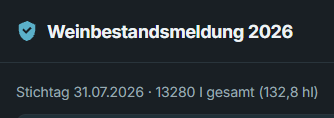
Stock declaration as at 31 July
| Type of wine | Stock |
|---|---|
| White wine | 14.320 l |
| Red wine | 6.850 l |
| Rosé / Rotling | 1.940 l |
| Total | 23.110 l |
Calculated out of the cellar book, by type of wine and quality level. None of it was maintained a second time.
Open the return.
“An inspection on site” · the traffic light before the audit
Vessel register, stock, accounts, evidence, journal: when the inspection comes, you print once.
- no longer needed No second list kept all year that is never quite right anyway.
- no longer needed No gathering and no recalculating before the deadline.
- appears on its own The declaration is filed afterwards and can be found again at an inspection.
Eleven things that make no better wine.
Vines, weather, the cellar: that is the job. What weighs on you are the records, the evidence and the returns, more of them every year. Tap a topic: what does VINORUM take off your hands?
 Enlarged
- appears on its own You document while you work — the record comes out of that by itself.
- no longer needed New requirements usually cost no additional entry at all, because the details are already in the system.
You pick the product. VINORUM knows the rest.
The record-keeping duties grew in 2026: authorisation number, rate, BBCH stage, leaf wall area. With VINORUM you do not copy any of that out. Pick a product on the phone and watch.
EnlargedThe authorisation number, the pre-harvest interval and the rates come from the official catalogue. The requirement calculator tells you how much you need for your area, product and water. You leaf through no package insert. In a tank mix this works with as many products per pass as you like, each with its own interval.
The guard · six weeks later
The application was booked on 28 August. Now the harvest is due. When does the trailer roll?
Choose a product first.
Climate & vine health · your own weather station
Three models run on the readings from your own station, not on a regional average. Plus a seven-day outlook. And the question that counts: when does the weather suit spraying?
- no longer needed No spreadsheet, no looking up pre-harvest intervals, no tally sheet for active-substance groups.
- appears on its own The plant protection report appears alongside — row spacing and canopy height belong to the parcel.
- appears on its own The fertiliser record per parcel comes out of the field records, with annual total and N load.
All 24 functions in this area+
What is listed here is built and in use. What is not finished is deliberately not on the list — do ask about it.
Parcels on the aerial image, drawn or imported+
Draw the areas on the aerial image or take over official exports; the area is calculated from the polygon.
The areas for your applications are in within minutes, and nobody types a hectare figure by hand.
Official parcel identifiers per federal state+
The land parcel identifier comes from the relevant state service at the click of a button.
Nothing is copied out of an application form, so no digits get transposed.
Field record with mandatory-field logic+
Every operation — plant protection, fertilising, soil, canopy, harvest — with exactly the details required. Entries cannot be altered, and every deletion is logged.
The documentation comes into being as you work and is complete when an inspector arrives.
Official product catalogue, refreshed weekly+
Every plant protection product for viticulture with its authorisation number, rates per growth stage, pre-harvest interval, conditions and active substances — straight from the authority interface.
The product list knows more than the folder of data sheets, and it is never out of date.
Seven guards when you save+
As a spray is saved, VINORUM checks: has the authorisation expired? the buffer zone? the number of applications? the bee condition? the same substance group too often? is the operator still qualified? has the machine been tested?
Mistakes become visible at the moment of the decision — as a warning, never as a block.
Plant protection report in the official column set+
The report appears in the form that becomes mandatory in electronic shape from 2027 — with leaf wall area, rate per unit of area and EPPO code.
The new record-keeping form is a printout, not a project.
Pre-harvest interval guard, right up to the harvest+
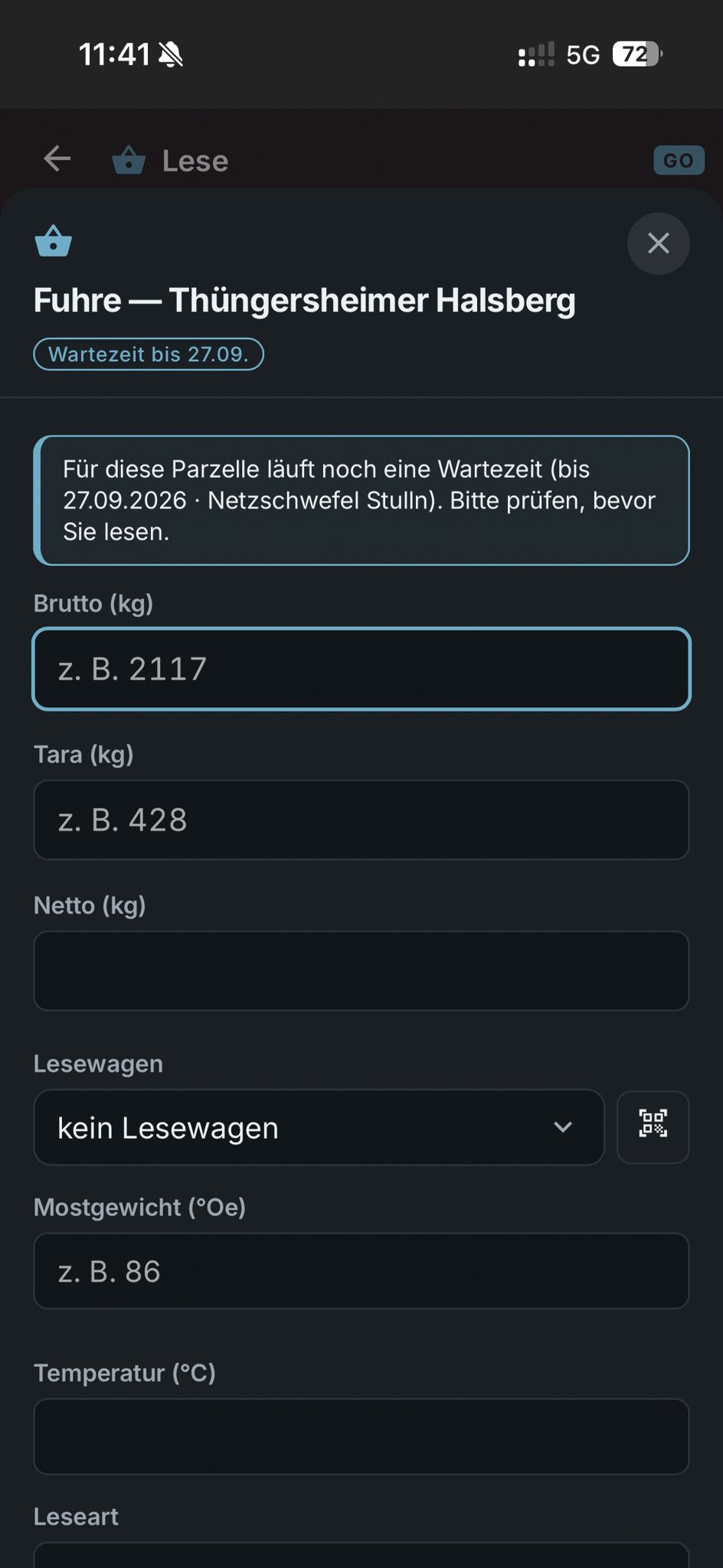
Every spray sets a date from which harvesting is free again. Harvest entry and harvest cockpit warn before anyone goes in too early.
No harvest inside a running pre-harvest interval — the most expensive mistake of the autumn simply cannot happen.
Growth stages with a year-on-year comparison+
Forty-three stages to choose from, observations as a curve — alongside them the previous years and their average as separate timelines. Observations can be added at any time; forecast stages are kept apart from observed ones.
“Are we early this year?” becomes a number: ten days earlier than the average of the two previous years, measured at the onset of ripening.
Ripeness forecast that recalibrates itself+
A heat-sum model calculates the dates of the stages from the weather series; every observation you enter calibrates it further. Every model stage and every vintage is there as a table alongside.
Harvest and work planning with dates instead of rules of thumb.
AI diagnostics — in development+
A diagnostic aid for the vineyard, currently being built. Available from the 2027 growing season.
It stands here because it is coming — not because it already works.
Report damage with position, photo and no signal+
A broken post, game damage, theft — with position, photos, an optional task, a map marker, a materials list and an insurance PDF.
The damage you spot on the pre-harvest round is recorded before it is forgotten.
“In the vineyard” — the phone knows the parcel+
Position in, parcel out: risk, pre-harvest intervals and the last operation are there at once.
You document where the work happens, not in the evening from memory.
Lease deadlines that speak up+
Lessor, term and notice period belong to the parcel; a task appears in good time before the cut-off date.
No lease renews itself unnoticed.
What you need to order before the season+
Last year’s consumption per product is set against your stock AND against the authorisation status of today.
You order what is still authorised, not what stood on the shelf last year.
Weather per site: own station, network or model+
Three kinds of source side by side; under every value it says where it comes from.
Weather for your site rather than “somewhere in the village” — and without a station of your own you can still start.
Three disease risk models, with their reasoning+
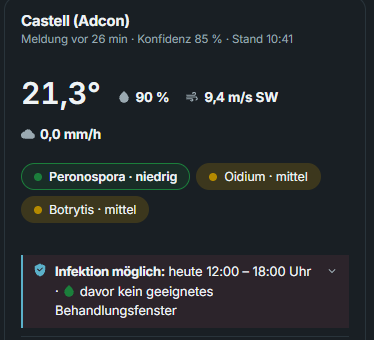
Downy mildew, powdery mildew and botrytis per station as an indicator — with the rule behind it and the protective effect of the sprays you recorded.
A look in the morning tells you where the risk is rising and why. A decision aid, not a spraying recommendation.
Seven-day risk outlook with infection windows+
The official forecast runs through the same models; upcoming infection windows are stated as a plain period.
You treat before the window, not after it.
Spraying conditions hour by hour+
Wind, gusts, rainfastness and evaporation give an hourly indicator, tied to the infection windows.
“Tonight, 7 to 11” instead of a hunch — deliberately the conditions only, never the product.
Rain radar with a two-hour outlook+
The official radar as a film, plus a line at the estate: “expected from about 08:05”.
The question “can we still get this load in?” is answered by a glance.
Severe weather warnings matched to your areas+
Official warnings are checked against the estate address AND against every parcel polygon.
The warning applies to your sites, not to the district.
Hourly day forecast at every station+
Temperature, wind and humidity as a daily curve, with rain bars and night zones.
The comfort of a weather app, where the work already happens.
Harvest cockpit+
Per parcel: ripeness, whether harvesting is free, seven days of weather, the last quantity brought in. Above it, free tank space and the people available.
“Can we bring in the Silvaner on Saturday?” is one view instead of four phone calls.
Loads recorded at the weighbridge+
Gross minus tare — you scan the trailer by QR code — plus must weight, condition and how it was brought in. One save posts the field record AND the cellar book in a single transaction.
One weighing, two statutory books. The origin of the batch is settled in the same moment.
Harvest overview with a yield indicator+
Brought in today and in total, weighted must weight, kilograms and hectolitres per hectare against the maximum yield of the region.
The state of the autumn is live — and the harvest declaration in January works from the same figures.
Every vessel knows what is inside it.
A cellar book that only works at the desk gets written up in the evening from memory. VINORUM books where the work happens — and carries the origin of every batch through all the moves.
Nothing is deleted. Corrections are counter-entries; the stock is always the sum of the journal and never a number somebody overwrote. The stock on any given date is one click away.
Blending is one operation. Several batches become a new one: VINORUM books the outgoings and the incoming together and passes on the origin proportionally. Without that, a blend counts as its own harvest and a bought-in share disappears from the record.
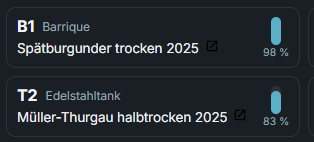
Analyses belong to the vessel, not the batch. If a wine sits in four vessels it develops four different ways — so the history shows one line per vessel, on a shared time axis.
 Enlarged
- no longer needed No note in a pocket, no evening shift at the desk.
- no longer needed No separate stock list, no back-calculation to a reference date.
- appears on its own Origin per batch is carried through blending — which saves the guesswork in the wine fund declaration.
All 10 functions in this area+
What is listed here is built and in use. What is not finished is deliberately not on the list — do ask about it.
A cellar book with an unbroken run of numbers+
Stocks are always the sum of the entries, never a field to overwrite. Corrections happen solely by reversing entry.
Your wine records are audit-proof by construction. There is no “quick fix”.
Vessel register+
Every tank and every barrel with its number, volume, location and what is currently in it.
The register an inspection asks for first is always up to date.
Blending with proportional origin+
A blend posts the outgoing and incoming quantities in one transaction; the shares from your own harvest and from bought-in wine pass on proportionally — through every move.
Labelling law and levies work from real shares instead of estimates.
Analyses per vessel as a curve+
Series of analyses per tank or batch, plotted over time.
You see the development instead of reconstructing it from slips of paper.
Sulphur guard before bottling+
Free and total sulphur dioxide are checked against the applicable limits, with a warning before you fill.
The sulphur stays within range before the bottle is full, not afterwards.
Enrichment calculator+
The amount of sugar per per cent of alcohol by the applicable figure, with a warning at the zone boundary; the result goes straight into the entry.
Calculating and documenting are one step, not two.
Bottling posts everything in one run+
One run creates the cellar book outgoing entry, the finished goods incoming entry and the material consumption from the bill of materials per packaging — including a query about losses.
2,000 litres become 2,660 bottles, with every entry made and the lot on the label.
Batches and lots per bottling+
Every bottling creates a lot with period, official test number, vessel and number of bottles; sales are counted against the lot.
In a recall, “which bottles?” is a piece of information, not a night shift.
“In the cellar” — scan and post without wifi+
Vessel labels with a QR code, scanning at the tank, entry without a connection. The queue transfers later and prevents double entries.
You post at the barrel instead of leaving a note on the cellar stairs.
Trace a bottle back into the vineyard+
From article and lot backwards: bottling, cellar book, grape intake, field record, parcel — as a PDF.
Traceability is one button — and it is honest about where it breaks.
One document that grows with you.
Office is the commercial side: from the address through the quote to the paid invoice. Nothing is typed twice, and the till in the tasting room is part of it. Try both.
 Enlarged
The document chain · restaurant customer Krug
Tasting-room till · walk-in customers in the afternoon
Invoices in a batch
One click creates and sends every invoice due that day. You watch live what went out and where something is missing.
- no longer needed No retyping of shop orders, no transferring of stock figures.
- no longer needed No folder for the tax adviser — the DATEV export is one click away.
- appears on its own Every invoice is an e-invoice out of the box, with no add-on module and no surcharge.
All 29 functions in this area+
What is listed here is built and in use. What is not finished is deliberately not on the list — do ask about it.
One address file with a history+
Customers, the trade, restaurants and suppliers in one file. The history shows documents, letters, entries, contacts and mailings per person.
One call, one look: who is this, what have they bought, what is outstanding.
Duplicate check that also catches similar sounds+
As you type the surname, the form reports existing addresses that sound the same — Maier, Mayer and Meyer end up next to each other.
The most expensive master data mishap — the duplicate address with a torn purchase history — never arises.
Several delivery addresses with acceptance windows+
Any number of delivery addresses per customer, with time windows (“Mon/Wed/Fri 8–12”) and a note (“call ahead”).
The delivery note carries the acceptance time automatically — the driver does not stand at a closed ramp.
Price lists per customer group, plus a customer discount+
Separate prices for the trade and for restaurants with rounding rules, plus a discount per customer. You create the groups yourself, as finely as you like. It applies in orders, in the Vinothek and in the shop account alike.
The trade price is in the document automatically — no mental arithmetic.
Article file with wine data and catalogues+
Vintage, grape variety, site, analysis values, ingredients and nutrition; varieties and sites come from curated catalogues. The unit price is calculated, never typed.
Maintained once, right everywhere: shop, label, shelf tag, channel, till.
Stock as a journal, not as a field+
Every movement is a line with a reason and a document reference; manual entries require a note.
“Why are twelve bottles missing?” can still be answered months later.
Packs and sets with a calculated stock+
Tasting packs as a bill of materials; how many can be packed is the minimum across the components. Sale and cancellation post the components.
No overselling of packs and no double stock — pre-packed or made up to order, both work.
Up to eight product images per article+
Several images per wine, in any order you like.
The shop shows bottle, label and detail without anyone hunting for files.
Isolating and correcting images, automatically+
Removing the background and correcting the image both run automatically, on a self-hosted open-source model on VINORUM servers; the isolated bottle can be placed into eighteen table scenes.
Shop-ready product images from a phone photo — no designer, and the photos never leave the platform.
Connector — printing as if from a Windows program+
Documents go straight from VINORUM to the printer at your desk. No detour through a PDF that has to be downloaded, opened and then printed.
The printout comes out where it belongs — with one click, as it did in the program that used to sit on the machine.
Quote, order and invoice as one chain+
Accepting a quote creates the order, the order posts the stock, the invoice links itself — as a collective invoice too. A cancellation reverses all of it.
Customer data and lines are entered exactly once, and the chain stays traceably connected.
One status chain for every way of delivering+
Open, to be made up, ready, on the way, delivered — parcel service messages and delivery round reports keep the status current by themselves.
One look at the list says where every order really stands. The one from the shop too.
Every document straight out of the order+
Delivery note, order confirmation, parcel label and invoice are produced in the browser, with your letterhead and text blocks. An output log records who printed or mailed what and when.
Nothing gets rebuilt in a word processor.
Electronic invoicing as standard+
Every invoice PDF carries the prescribed XML embedded; on request it also travels as a separate file in the mail.
Business and public sector customers get the electronic invoice with no extra module and no extra charge.
Dunning in three stages+
Overdue invoices with stages, fees and deadlines; every letter is logged unalterably and can be mailed directly.
Chasing payment becomes a quarter of an hour on Friday instead of a disliked weekend job.
Bank movements straight from the bank+
Retrieved straight from the bank — signed in and confirmed just as in online banking. Or the statement file from online banking in the common formats; VINORUM works out which one it is. Payments are matched to invoices and early payment discounts are recognised.
You tick off incoming payments instead of typing them — and “paid on” is the real value date.
Early payment discount that agrees everywhere+
The discount belongs to the payment terms, appears on the document as a dated snapshot and is recognised when the bank statement is matched.
Discount deductions are no longer “a difference to clarify”.
Posting batches for the tax adviser+
Finished batches in the common formats, accounts and financial year as master data, VAT per rate from a single calculation.
The tax adviser gets files instead of a folder of documents. Transcription errors disappear.
Supplier orders with goods receipt+
Purchase documents with goods receipt, part deliveries included; the receipt posts the stock.
Corks and cartons no longer run out unnoticed.
Order proposal from minimum stock levels+
The proposal works from minimum levels less the quantities already on their way.
Nothing gets ordered twice because somebody overlooked an open order.
Mail merge to a filtered set of recipients+
Letters with templates and placeholders, linked to an address or an article, as one combined PDF.
The invitation to a tasting for two hundred customers is one task, not an afternoon.
Documents filed on the right object+
Files by drag and drop, with date and category, linked to an address, an article or a machine. Access only when signed in.
The contract hangs on the customer, the test certificate on the machine — not in a folder called “Scans 2026”.
Parcel shipping without a contract of your own+
Labels straight from the order through the usual parcel services, the price visible before you buy, age verification for eighteen and over, tracking through to “delivered”.
No hopping between portals: label and status live in the order.
Multi-parcel logic that really works it out+
Forty-two bottles become two eighteens plus one six. Weights come from the articles, all labels from one print run.
Large orders without a calculator and without clicking through labels one by one.
Pallet freight for the big deliveries+
Pallet consignments with collection date, tail lift and notification, plus the consignment note and status messages.
The sixty-carton delivery to the trade also runs out of the order.
Tracking on the document+
Invoice and delivery note carry the carrier, the consignment numbers and a tracking link you can click.
“Where is my parcel?” calls answer themselves.
Reports from real documents+
Turnover, top articles, top customers, channels and stock coverage over any period, including a financial year that differs from the calendar.
Decisions from figures instead of from a feeling.
Cost rates with a validity date+
Wages and machine hourly rates are kept with a period; the old rates stay in place.
A report about last year works with last year’s rates.
One search across everything+
A single field across customers, articles, documents, barcodes and settings; a hit opens straight away.
The way to anything is a keyboard shortcut, not a menu tree.
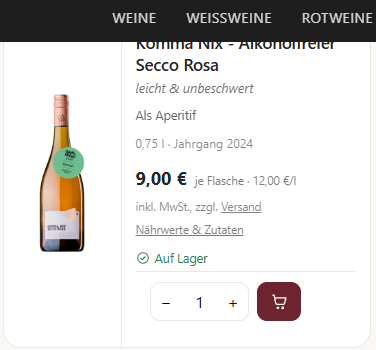
23:04. Somebody orders.
The usual arrangement: shop system here, merchandise management there, and between them an interface that runs overnight and sometimes sticks. In VINORUM that interface does not exist, because there is nothing to connect. Play the customer.
 Enlarged
Enjoy your evening.
And afterwards: shop reports
Every shop system shows you top products. The more interesting list is the other one: which wine is not moving. Plus turnover by month, by category and by payment method — switchable to this month, last month, the year, or all time.
Sales channels
Show the same articles where customers are looking — without maintaining them a second time. Every channel states what it costs and where the sale is concluded: in your shop or on the platform.
A newsletter with a funnel
The recipients are your own addresses with the newsletter box ticked, and the unsubscribe link is attached automatically. After it goes out you see the whole path: who opened it, who clicked what — and which order came of it.
- no longer needed No duplicate article maintenance, no overselling.
- no longer needed No commission to a platform — the customer pays into your account.
- appears on its own An order at 11:04 pm is an order at 11:04 pm, with customer, prices and stock movement.
All 15 functions in this area+
What is listed here is built and in use. What is not finished is deliberately not on the list — do ask about it.
Vinothek sales on a tablet+
A touch grid with photos, customer group prices and one-off lines. New customers can enter themselves on the locked device.
A sale at the estate creates order, invoice and stock entry in one go — nothing to write up in the evening.
A till with a certified security device+
A signature per receipt through a certified technical security device from the cloud, one till per device, a cash journal and a close-off with a counting record.
The till inspection becomes a printout — and the contract for the security device runs through VINORUM, not through you.
Card payment with a paired terminal+
Card payment starts from the till on the paired terminal; the receipt number appears in the provider’s statement. Refunds run through a cancellation or a credit note.
Card payments without entering anything twice — and the statement agrees with the till.
Fallback mode when the network drops+
The till switches to a number range of its own, keeps printing receipts and transfers later with the real time. The outage is documented.
The estate festival in a signal hole carries on — with a receipt for the guest and a clean record of the outage.
The shop is VINORUM+
The storefront takes articles, wine data, stock, prices, awards and images straight from the business. Server-rendered, without tracking, with speaking addresses and structured data.
There is no second product database and no interface that jams overnight. Sold out means sold out.
Built for search engines and for AI answers+
Every page arrives finished from the server, with speaking addresses and structured data per wine — so search engines and AI answer services read the text itself, not what a script loads later. Inside the shop, the wine advice draws on the same data.
Your wines are found and quoted correctly — including where people no longer click but ask.
Customer accounts and a trade view+
The account belongs to the address, released group prices apply net, “your wines” is a quick reorder list. Which customer groups exist is up to you — a single merchant as readily as a whole group of them, each with its own prices and discounts. Restaurants get an ordering link that needs no sign-in.
The restaurateur reorders instead of ringing up — at their own prices.
Online payment into your account+
Card, Apple Pay and PayPal in your own checkout. The order is provisional first and becomes binding when the money arrives.
The money is there before anyone packs — and VINORUM is never in the flow of funds.
Promotional prices with a stored price history+
A struck-through price only appears where the lowest price of the last thirty days is on record; the price history cannot be altered.
Discount campaigns on a basis you can show.
Vouchers as a balance journal+
Value and campaign vouchers at the till and in the shop, part redemption a matter of course. Redemption is a means of payment with the correct VAT; the PDF carries a motif and a QR code.
Vouchers are clean for tax and never get lost — the balance can be recalculated.
Wine advice in the shop, with guard rails+
Advice from your own wine data. The server only shows wines that exist and are available, and it filters out health claims. Without AI a rule-based adviser stays in place.
Advice like at the counter, around the clock — with nothing that can be invented.
Newsletter with proof of consent+
Mailings with placeholders, a consent record (when and from where) and a delivery log per recipient, with an unsubscribe link.
Advertising to people who asked for it — and you can prove it.
Audiences built from real behaviour+
Select recipients by last purchase, variety bought, a visit as a guest, turnover or postcode. Whether a channel may be used is decided by the server, not by the user.
“Everyone who bought Silvaner and has ordered nothing for twelve months” is a selection, not a night with a spreadsheet — possible only because the shop, the till and the address book are the same system.
Product feeds for portals+
One feed per channel out of the article file, with a mandatory-field check and a guard against health claims that are not allowed.
Being found on portals without maintaining product data twice.
The e-label behind the QR code+
Ingredients and nutrition per wine on a separate, neutral address — no tracking, no advertising. For a pack, every wine it contains appears.
The QR code on the label leads to a page that shows exactly that and nothing else.
Guests who book themselves.
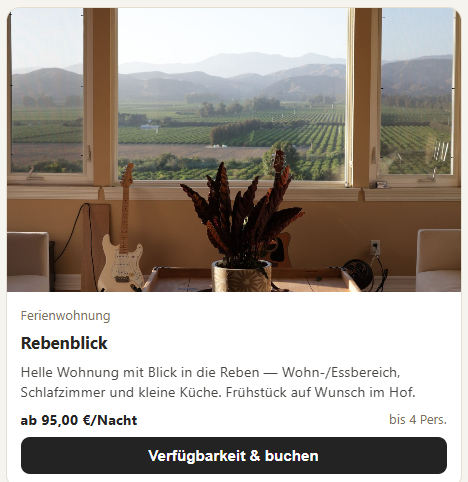
Holiday flat, pitch, tasting, guided tour: winegrowing programs mostly do not cover this at all. People make do with portals that take a commission and keep the guest data. In VINORUM the guest is your customer. Confirm the enquiry, then scan the tickets.
 Enlarged
Occupancy board · holiday flat, this week
A booking stays an enquiry until the money arrives. Rules instead of questions: minimum stay, arrival days, seasonal prices, gap control against a single unlettable night.
Saturday, 18:00 · tasting, at the door
You set the dates up as a series, guests book online, and the place is held while the payment goes through. The scan works offline too; the check-ins catch up later.
What the confirmation sets off
Confirm the enquiry.
- no longer needed No second calendar, no phone calls to check, no booking lost in an inbox.
- appears on its own The confirmed booking becomes the order, and the order becomes the invoice.
All 5 functions in this area+
What is listed here is built and in use. What is not finished is deliberately not on the list — do ask about it.
Occupancy board with half-day logic+
Holiday flats and pitches on one board; the day of departure may also be a day of arrival. Blocks and cancellations, with an undo.
Occupancy is a board, not a wall calendar.
Online booking by your rules+
Season prices, minimum stay, permitted arrival days and gap control against unlettable single nights. Either as an enquiry or binding with a deposit.
Bookable around the clock, without a portal commission.
Events and tours with series of dates+
Offers with repeat rules and a capacity, online booking that holds the place while payment happens.
Tastings fill up by themselves, and overbooking is technically impossible.
Tickets with a QR code and a scanner+
The ticket goes out as a link or a QR code, is cancelled on the phone and every scan is recorded. For entry without a signal there is an offline check mode.
Entry at the wine festival without a guest list on paper.
A booking becomes an order+
Active bookings create the order automatically if you want, with a separate tax rate where needed.
The room and the tasting land in the same invoicing and reporting cycle as the wine.
You do not have to remember that you have to remember.
Classical programs are passive: they store what you enter, and wait. If you miss a deadline the program did nothing wrong — it simply did not know about it.
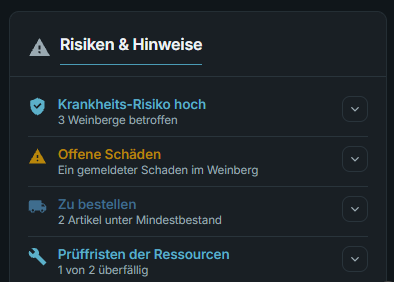 Enlarged
Tasks create themselves. An approaching filing deadline, a critical finding — VINORUM creates the task and writes down where it came from. No guessing about entries somebody else made.
Set up recurring work once. Weekly, monthly, yearly, on the last working day: the task appears when it is due, and not in an endless list.
Everyone sees the same thing. Your staff work through the same list, ticking off takes one tap — on the phone in the vineyard just as at the desk.
And the roster counts along. People, vehicles, sprayer and rooms sit on one board, with the guards that belong there anyway: double booking, workshop lock, inspection date.
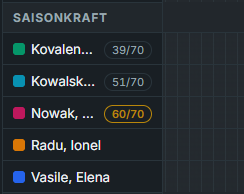 Enlarged
- no longer needed No slips of paper, no missed deadline, no “did you do that?”.
- appears on its own Tasks create themselves — and each one says where it came from.
All 11 functions in this area+
What is listed here is built and in use. What is not finished is deliberately not on the list — do ask about it.
“Today” — the way into the day+
Tasks, deadlines, guests, appointments, risk, staffing notes and supplies on one page, according to the rights of whoever is looking.
The day starts with a list instead of five modules.
VINORUM GO — the phone view+
VINORUM for your pocket: weather where you stand, the time clock, tasks and a menu into vineyard, cellar, harvest and tickets. Recording happens where the work happens; entries work with no signal and transfer later.
The app for your pocket — usable outside, not just presentable.
Instructions in the worker’s own language, out on the estate+
Not only when someone is taken on: instructions run on the phone, in the language of the person receiving them, and are signed on the display. The record then sits with the business and with the person instructed.
People are instructed where the work is — and the record comes into being there, not in the office that evening.
Tasks with series+
Tasks with an owner, a priority and repetitions — weekly, monthly, yearly.
What comes round again no longer gets forgotten.
Rules that also close tasks again+
Rules create tasks by themselves — pre-harvest intervals, reporting deadlines, expiring certificates, test dates, analyses due, stock levels, the dunning list, cleaning after departure, leases. When the reason falls away, the task closes.
You do not have to think about the deadline. The deadline thinks about you.
One personnel file for everybody+
Staff and seasonal workers with languages, certificates, wage history and type of employment. The personnel right is separate from all the others.
Whoever assigns rights does not see wages. Whoever plans sees the certificates.
Seventy-day counter for seasonal workers+
Calendar days from the assignments plus days reported elsewhere, a warning from sixty, red above seventy — while you plan and in “Today”.
A seasonal worker does not slide unnoticed into compulsory social insurance.
Onboarding assistant with an instruction record+
A new worker in three steps on the phone: master data with a duplicate check, photo and identity document with consent, the safety instruction in their mother tongue with a signature on the screen. The signed text is frozen.
The first working day is documented before it begins — with a PDF record.
Staffing board with guards+
People AND machines on one timeline. As you plan, VINORUM checks double bookings, absences, the seventy-day count, posting certificates, driving licence classes, machine tests and the instruction required.
The plan sees the conflicts before the estate does.
Resources with test dates+
Vehicles, sprayers, machines and rooms with test dates, cost rates and their validity, blocks, QR inventory stickers and condition photos.
The test date of the sprayer is where the spray is recorded.
Printing on site+
A small program in the business sends documents to the right printer and tray, drives the receipt printer and opens the cash drawer. Every device is released by the business.
The delivery note comes out of the warehouse printer — from the web app.
Here wine law is a result, not a form.
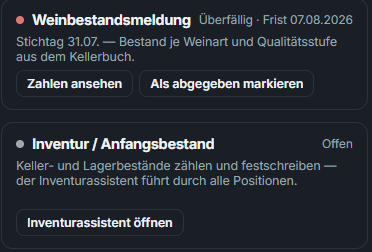
In classical programs you enter figures you gathered somewhere else first. In VINORUM the figure in the declaration comes from the same entry you made while working in the cellar.
 Enlarged
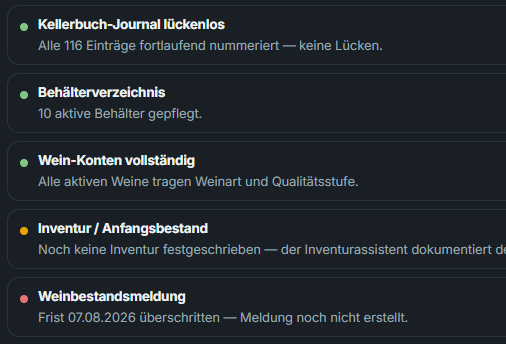
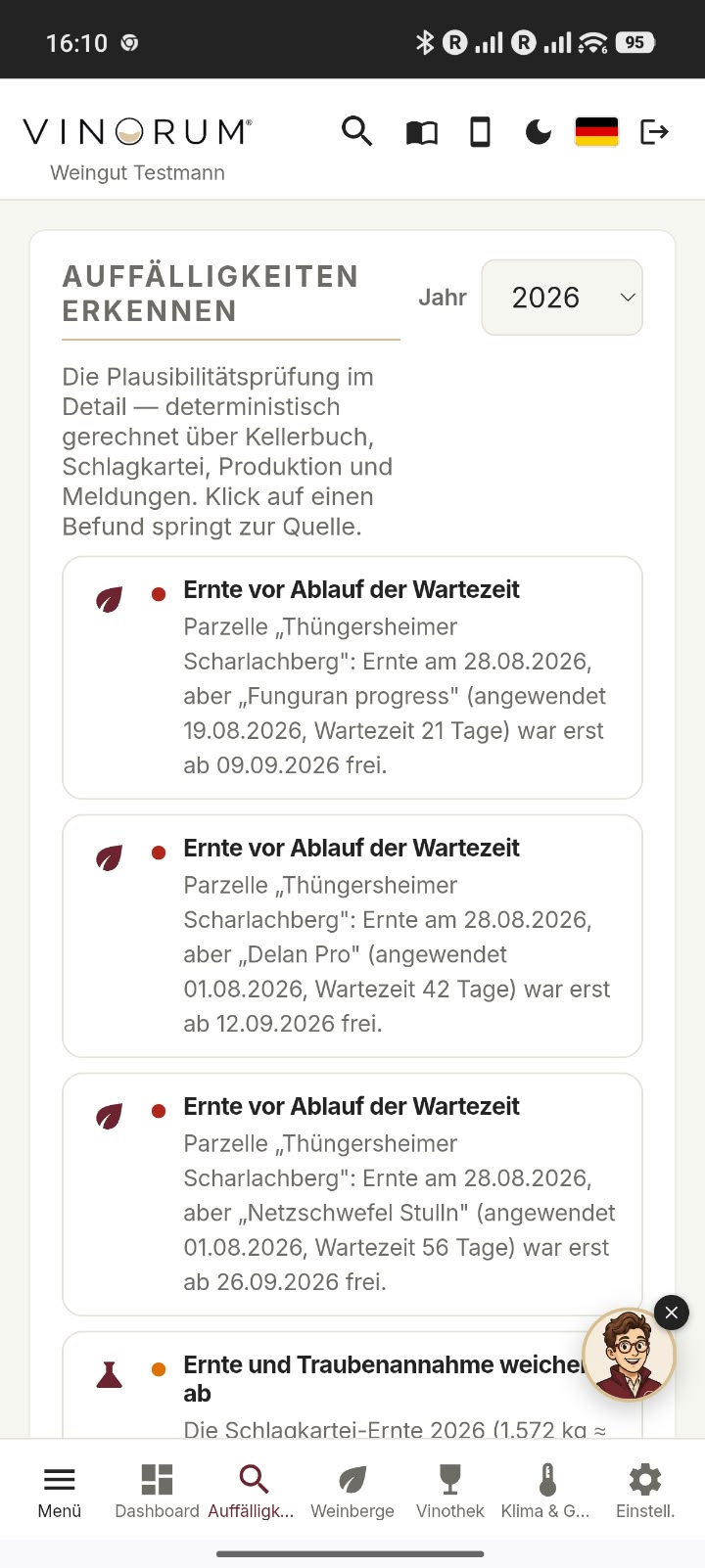
Plausibility before the inspection. Does the harvest quantity match the grape intake? Do bottling litres and bottle count agree? Are there negative stocks? VINORUM asks that before anyone else does.
And it asks again afterwards. If entries were made after submission, VINORUM says so: “the stock has changed since the declaration”. Nobody else makes that comparison.
The inspection folder is one PDF. Vessel register, stocks, accounts, records, journal. When the inspection comes, you print once.
Stocktaking with an assistant. Count list for cellar and warehouse, enter the actuals, see the differences — on committing they become proper entries with a protocol. Saving in between included, because a stocktake rarely happens in one sitting.
- no longer needed No gathering, no recalculating, no night before the filing deadline.
- appears on its own The inspection folder comes as a single PDF: vessel register, stocks, accounts, records, journal.
All 8 functions in this area+
What is listed here is built and in use. What is not finished is deliberately not on the list — do ask about it.
Declarations as an extract of the books+
The stock declaration, the harvest and production declarations and the fertiliser documentation come out of the cellar book and the field record — as a PDF, with a snapshot in the register.
The declaration is an extract of books you keep anyway. No second set of records.
Deadlines with lead time+
Curated dates create tasks in good time — once per deadline, not afresh on every visit.
No deadline hangs on one person’s memory any more.
Spotting what stands out — fourteen plausibility checks+
Among them: the difference between harvest and intake, a negative batch, a maximum yield exceeded, a harvest before the pre-harvest interval ended, a declaration that no longer matches today’s figures, sulphur values, several batches in one vessel, the nitrogen ceiling. The calculation is deterministic, across the cellar book, the field record, production and declarations, by vintage if you like. A click on a finding jumps to the place it came from.
The system finds what stands out before the inspector does.
Inspection folder as a single PDF+
A checklist with a traffic light plus one package: vessel register, stocks, journal and certificates in one file.
When the wine inspection rings the bell, the folder is a printout.
Stocktaking assistant+
A counting list across cellar and warehouse, saving in between allowed; differences become regular entries and the record falls out as a PDF.
A stocktake that is written down properly instead of on spreadsheet slips.
Wine fund levies from real origin+
Area and sales levies as a preview; sales are apportioned by actual origin, and bought-in wine does not count.
The figures are derived, not estimated — and the derivation stands next to them.
Packaging quantities from bills of materials+
Reportable quantities come from the bills of materials times the quantities sold, split between consumer and trade, shipping cartons from the consignments.
The packaging report is calculated instead of guessed. Nobody weighs bottles.
Till data for the tax office+
The standardised export for a till inspection, a backup of the security device store and a finished data sheet for registering the till.
The requirements for electronic tills without any specialist literature.
What happens outside — but only when it concerns you.
Until here you recorded and VINORUM reacted. From this point the direction reverses: these notices appear without anyone clicking. Each one says why it concerns you in particular.
 Enlarged
- no longer needed No searching through official gazettes, no expiry missed, no funding deadline discovered afterwards.
- appears on its own Every notice states why it concerns you in particular.
All 4 functions in this area+
What is listed here is built and in use. What is not finished is deliberately not on the list — do ask about it.
Product guard against your own field record+
When an authorisation changes, VINORUM matches it against your applications: “you used this product three times — the authorisation is ending.”
You hear about the change because it concerns your estate, not because it was published.
Official warnings and news from the trade+
Severe weather warnings matched to your areas and news from the sector arrive in the same list.
One place instead of five newsletters.
Funding programmes that fit the business+
Programmes checked by the operator, with matching rules against your business profile — “for your estate” or “for the sector”. They are sorted, never filtered away.
Funding hints that fit — and nothing disappears because a filter caught it.
Guided tours through the running app+
The assistant clicks through the real application — plant protection records, the basics, a walk-through. Because it is the real app, the tour is never out of date.
Training without videos that go wrong at the next update.
The cellar has no Wi-Fi. VINORUM does not care.
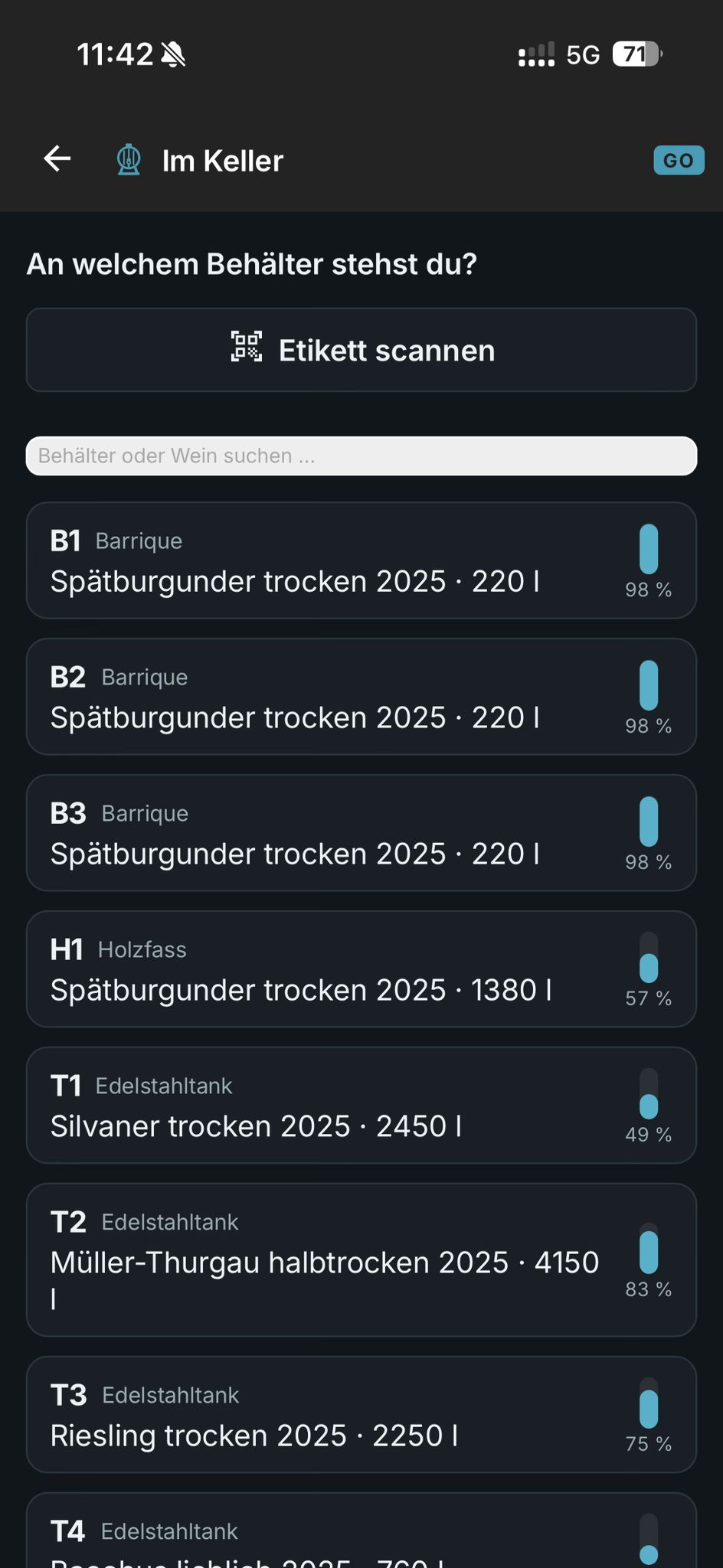
A cellar book that only works at a desk gets written up from memory in the evening. VINORUM makes the entry where the work happens: at the tank. Scan the QR code — and do go ahead and switch the connection off.
Your entries
No entries yet. Scan the tank.
This is covered too: no connection anywhere else on the estate +
An emergency workstation in the office. If the internet drops, one designated device keeps working: orders, quotes, addresses. It fetches its document numbers in advance, so that nothing ends up numbered twice.
Emergency mode at the till. Cash sales in the tasting room even without a connection, carrying the note the law requires on the receipt. Deliberately narrow and set up with tax advice: cash payment, articles from stock, no vouchers.
Checking tickets. The guest list is on the device before the doors open, and tickets are marked used offline. The wine festival does not wait for a mobile signal.
And what does not work offline: Card payments, online payments, shipping labels, email, weather and authorisation data, VINI. Somebody at the other end has to answer. Better to say so here than to raise an expectation that lets you down at the moment it matters.
- no longer needed No entry lost in a dead spot — and no silent data loss.
- appears on its own Every operation gets its own key. If it arrives twice, it is booked once.
Ask questions instead of searching.
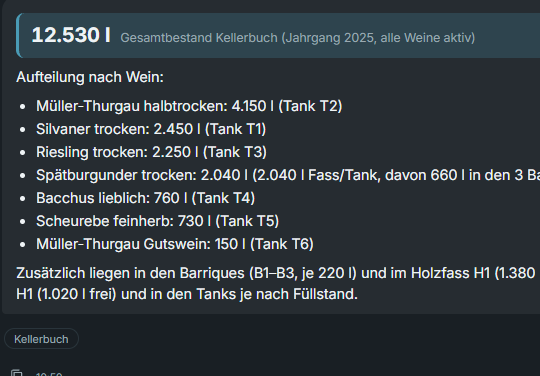
An assistant is only as good as the data it is allowed to look at. VINI looks at the whole estate — and only reads. It cannot change, book or delete anything; that is not a limitation but a commitment.
 Enlarged
Reads only, never changes. Names its sources. Answers only within your own permissions.
- no longer needed No hunting through menus, no leafing through the manual, no report to click together.
- appears on its own Under every answer stands which areas were consulted.
All 1 functions in this area+
What is listed here is built and in use. What is not finished is deliberately not on the list — do ask about it.
Ask in plain language, get an answer with its source+
Thirteen tools with read-only access — stocks, turnover, documents, climate data, the manual, the way around. Every answer names where the figure came from. The conversation belongs to the user.
“How much Riesling is left?” gets asked instead of searched for. VINI has read-only access, always, and only within your own rights.
Converting means changing a setting.
In VINORUM the farming method is not an add-on but a property of the estate — and of every single parcel. From that one entry follows which limits apply and which documents appear for the inspection.
Status per area, not only per estate. Parallel production is everyday practice: one part converted, the rest not yet. The organic inspection checks parcel by parcel — so the status belongs to the parcel and is visible there as a mark.
The copper account counts itself. The active substance content comes from the official register, the application rate from your field records. Out of that comes pure copper per hectare — as an annual figure and as a rolling multi-year total, visible during the year instead of in winter.
Association limits are adjustable. Anyone who hard-codes the EU figure warns an association member too late. So the limit is a field, not a constant.
A question, not a block. If you record a product on an organic area that VINORUM does not know as usual there, it speaks up before saving — with the option to record it anyway. You know your estate better than any software.
Honest in both directions. VINORUM never says “organic-compliant”. And a product our overview does not list is not thereby prohibited: the known input lists are voluntary and chargeable. We say what we know — and where we know it from.
- no longer needed No second system and no parallel spreadsheet during conversion.
- appears on its own Copper balance, parcel-level assignment and quantity balance come out of what is recorded anyway.